Secure your AI agent in 5 minutes with identity-aware authorization
Adding identity-aware authorization to an agent; and handing the security decision to the people who should actually own it.
DENYYour AI agent just restarted production. It never asked who you were.
On this page
Picture a team that shipped a DevOps assistant a few weeks ago. Nobody sat down and decided to give it production access, it just accumulated. The agent was handy, everyone started leaning on it, and somewhere along the way "handy" had quietly turned into "can restart prod."
Here's roughly what it looks like. Engineers talk to it in plain English; it reads logs, restarts services, scales deployments:
from agents import Agent, function_tool

@function_tool
def read_logs(service: str, env: str) -> str: ...

@function_tool
def restart_service(service: str, env: str) -> str: ...

@function_tool
def scale_deployment(service: str, replicas: int, env: str) -> str: ...

agent = Agent(
    name="devops_agent",
    instructions=INSTRUCTION,
    tools=[read_logs, restart_service, scale_deployment],
    model="gpt-4o-mini",
)
Useful. Also the kind of thing that keeps you up once you think about it for a minute.
The problem
Olivia joined three weeks ago. Junior dev, still ramping, and she has exactly the same access to the agent as the person who wrote it: because the agent has no idea who she is. She types:
"Check the logs of the web service in prod, then restart it."
And it does. Nothing in the loop asked whether Olivia, specifically, should be bouncing a production service.
The agent's instructions do try. Buried in the system prompt is a line: "Never restart or scale a production service unless the request comes from an authorized operator." Someone added it to feel a bit safer. It shouldn't help, and it doesn't. It's a sentence in a prompt, which means you're trusting a language model to enforce a rule it has no way to check, and then to police itself. Models misread intent, get talked around, and occasionally just decide the rules don't apply this time. And "authorized operator" is doing a lot of work here: the agent has no idea whether Olivia is one, because nobody ever told it who she is. The question that actually matters (should this person be allowed to do this thing?) isn't answered anywhere in the code above.
That check doesn't belong to the model. It doesn't belong to the developer who happened to write the tools, either. It belongs to whoever owns security.
Enter Hexgate
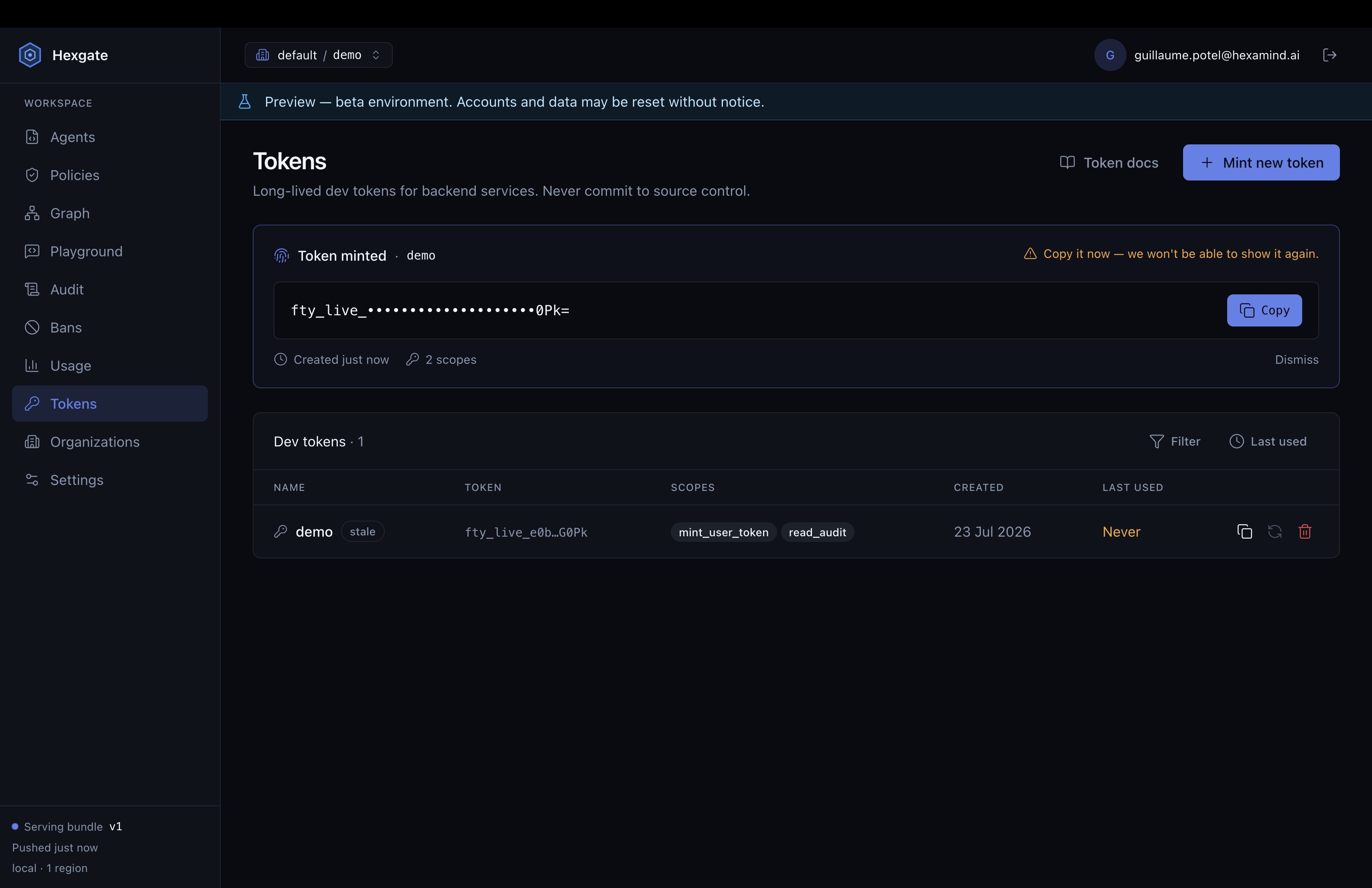
Hexgate is the layer that's missing here. If you've set up Langfuse, you already know the shape of this: sign up, create a project, mint an API key, paste it into your .env as HEXGATE_API_KEY.
Back to the code.
Register the agent
pip install hexgate
hexgate register --agent devops_openai:agent
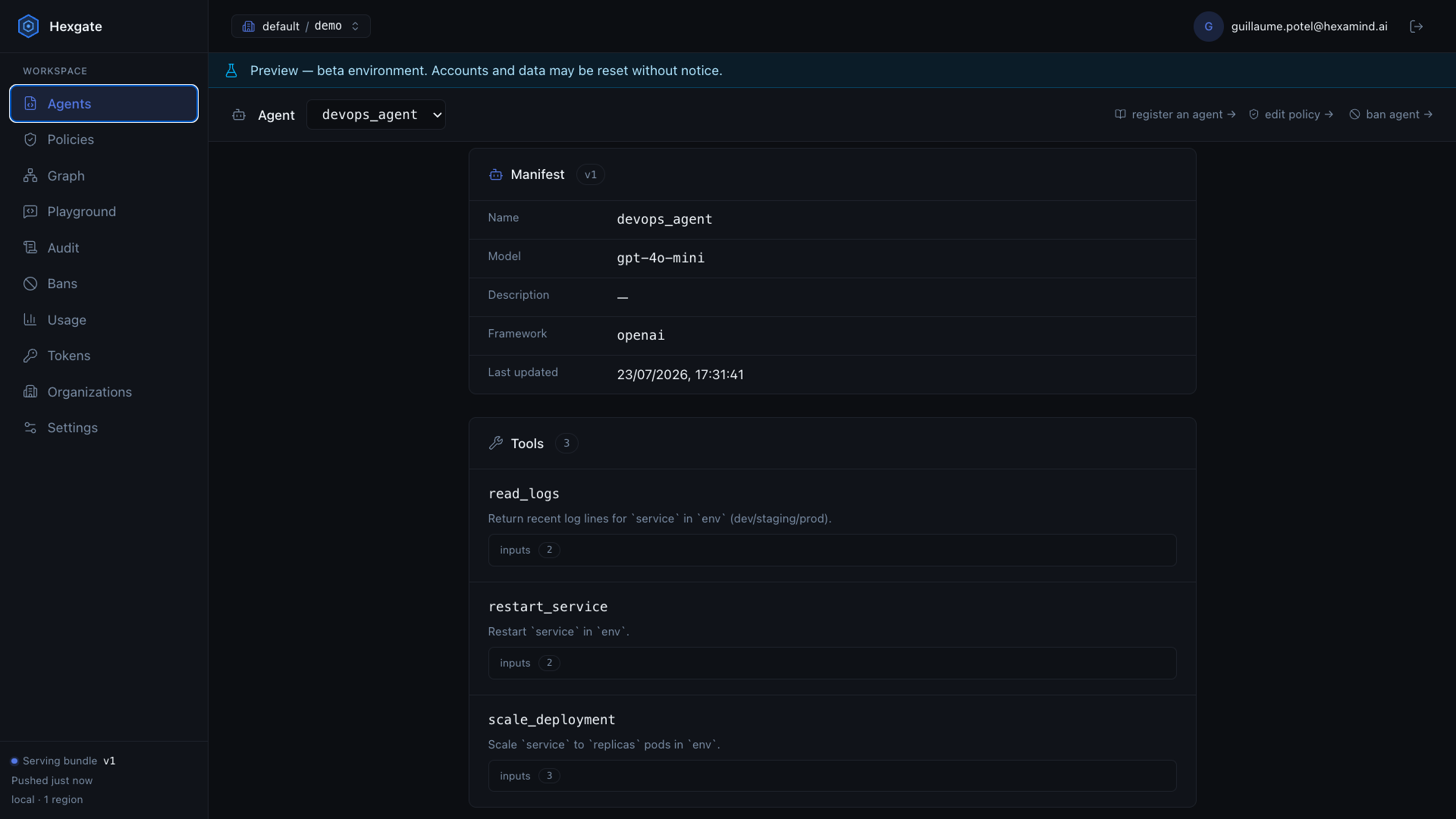
This reads your agent and ships a manifest to the platform: the name, the model, the system prompt, and the part that matters here: every tool it can call. The agent shows up in the dashboard with all three tools laid out. Seeing restart_service and scale_deployment sitting there in a list, owned by nobody in particular, is its own small wake-up call.
Write the policy — on the platform, not in the code
Now the team's security lead opens the policy editor and writes down who's allowed to do what. No pull request, no redeploy, no waiting on the developer who built the agent. Here's the policy she lands on to separate a day-to-day operator from an admin:
version: 1

roles:
  read_only:            # shared base: everyone can read logs
    is_mixin: true
    tools:
      read_logs:
        mode: allow

  operator:             # dev/staging only, small scale
    inherits: [read_only]
    default_policy:
      mode: deny
    tools:
      restart_service:
        mode: allow
        constraints:
          - 'args.env in ["dev", "staging"]'
      scale_deployment:
        mode: allow
        constraints:
          - 'args.env in ["dev", "staging"]'
          - 'args.replicas <= 10'

  admin:                # prod allowed, much higher replica cap
    inherits: [operator]
    default_policy:
      mode: deny
    tools:
      restart_service:
        mode: allow
      scale_deployment:
        mode: allow
        constraints:
          - 'args.replicas <= 200'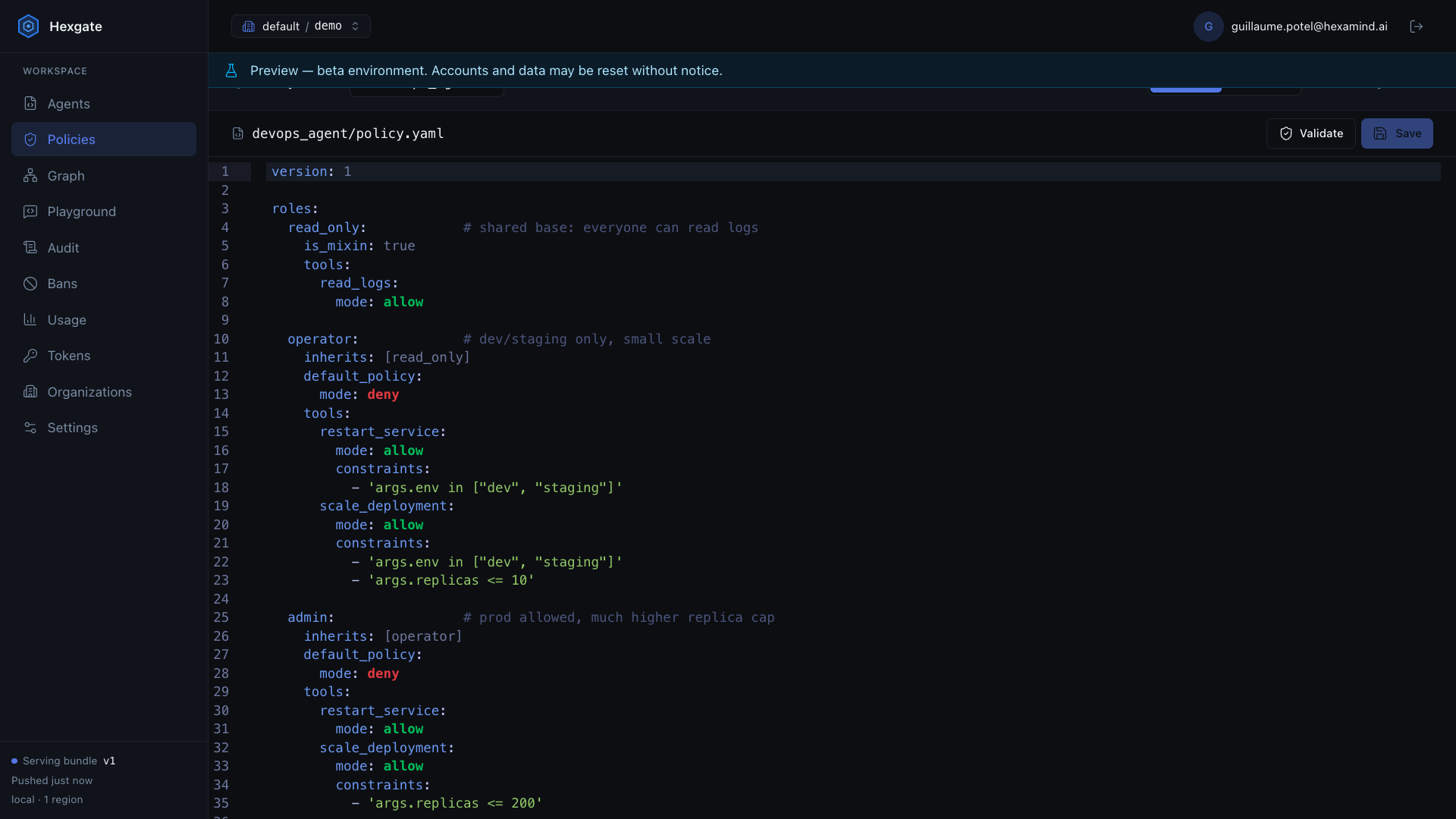
The detail worth pausing on is that the gate reads the arguments, not just the tool name. An operator can restart services — but only in dev or staging, because of args.env in ["dev", "staging"]. Scale, sure, up to ten replicas. An admin gets the same tools with the ceilings raised. And everything defaults to deny, so a tool nobody thought to mention is simply off. You opt into capabilities; you never have to remember to opt out.
The developer never touches this file. That's the whole point — the security lead owns it, and when the rules need to change, they change on her screen, not in anyone's repo.
Enforce it — two lines
This is the agent before Hexgate does anything:
from agents import Agent, Runner

runner = Runner()
result = await runner.run(
    agent,
    "Check the logs of the web service in prod, then restart it."
)
And after — swap Runner for HexgateRunner, and pass a HexgateContext:
from hexgate.adapters.openai import HexgateRunner
from hexgate.runtime import HexgateContext

runner = HexgateRunner()
result = await runner.run(
    agent,
    "Check the logs of the web service in prod, then restart it.",
    hexgate_context=HexgateContext(
        user_id="olivia", session_id="s1", user_roles=["operator"]
    ),
)
That's it. The user_roles aren't hardcoded in real life — you pull them from whoever is actually logged in. So the interesting thing is what happens when the same sentence comes from two different people.
Olivia, the operator, asks again:
"Check the logs of the web service in prod, then restart it."
The agent reads the logs — everyone's allowed that — and then stops. The restart fails the args.env in ["dev", "staging"] check and comes back denied. Her lead types the exact same sentence as an admin and the service bounces. Run it twice in a row, changing nothing but user_roles=, and it's a little startling the first time.
The replica cap behaves the same way:
"Scale the search service to 50 replicas in staging."
An operator gets turned down — staging's fine, but fifty blows past their limit of ten. The admin's request goes through; fifty is nowhere near their cap of two hundred.
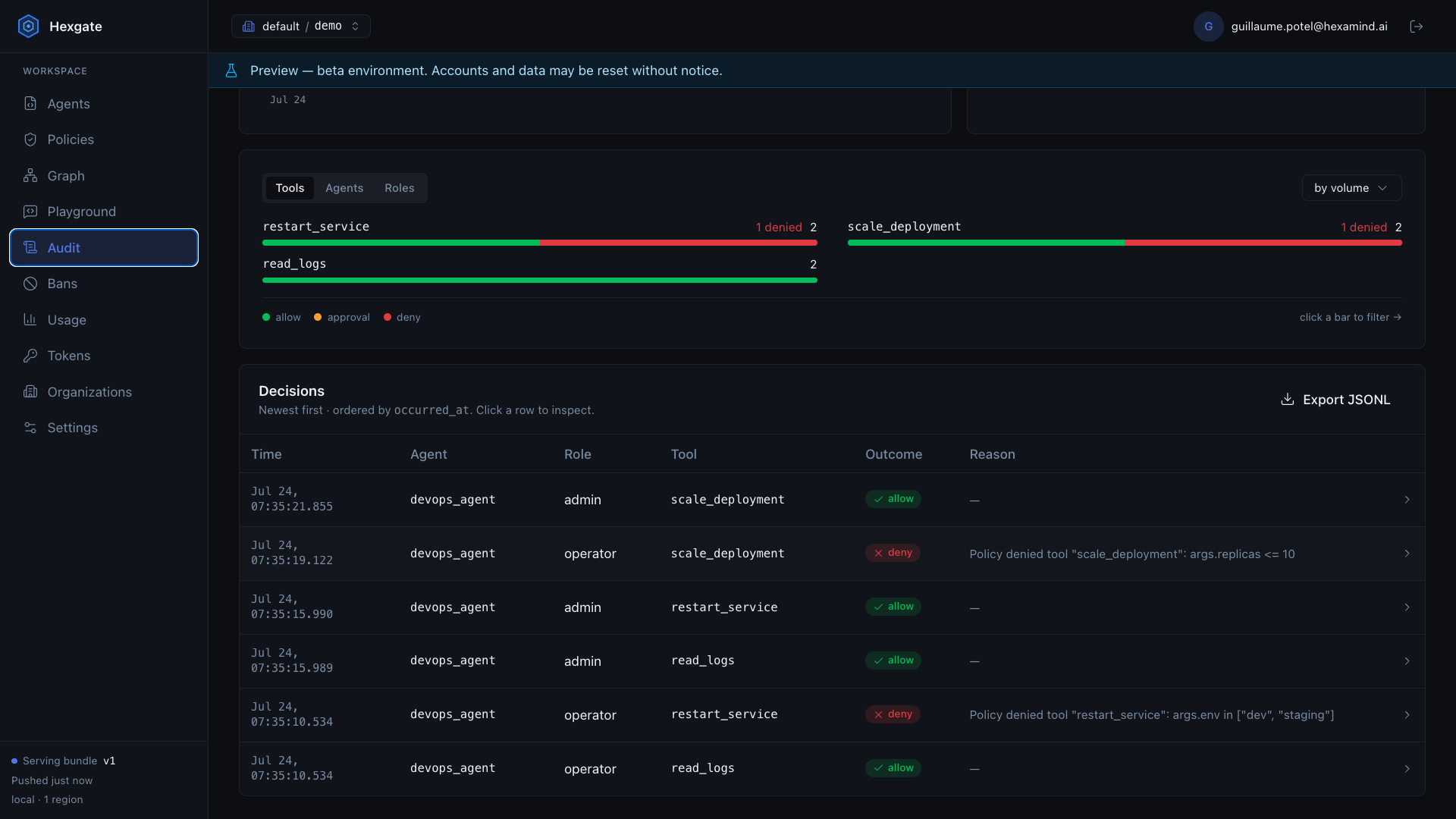
The Python is byte-for-byte identical across both. The only thing that moved was who was asking.
What actually changed
The install and the register command take a couple of minutes. The two-line runner swap takes less. But that's not the part that matters.
What changed is where the security decision lives. It used to be an accident of whatever the developer wired up and whatever the prompt happened to say. Now it's a policy the security lead can read, argue about, and edit without ever opening the codebase, and it stops being a language model's judgment call. The developer writes what the agent can do. Security decides who's allowed to do it.
Olivia still has a fast, genuinely useful agent. She just can't restart production from a chat box anymore, and neither can the person who built it. That's the point.
This is a walk-through of what Hexgate is built to do. For your own custom agent: sign up, grab an API key, pip install hexgate, and see how long it takes you.